pnpm+monorepo搭建
项目结构
yjblog-monorepo
  ├─ apps/
  │  ├─ backend/
  │  │  └─ package.json
  │  └─ frontend/
  │     ├─ mobile/
  │     └─ web/
  │        └─ package.json
  ├─ packages/
  │  ├─ cli/
  │  │  └─ package.json
  │  ├─ components/
  │  │  └─ package.json
  │  └─ utils/
  │     └─ package.json
  ├─ docs/
  ├─ package.json
  ├─ pnpm-workspace.yaml
  └─ packages/*/package.json
初始化工程
- 创建yaml
touch pnpm-workspace.yaml- 告诉pnpm哪些子包在哪个位置
packages:
  - "packages/*"
- "apps/*"- 初始化工程,创建package.json
# 在工程根目录下
pnpm --workspace-root init
# or
pnpm -w init
# or
pnpm -C 子包路径 [...]
# 工程命令,这里/表示选择一种方式
pnpm -w/--workspace-root [...]
环境版本锁定
- 包管理器
- node 版本
- pnpm 的版本
全部在根工程配置
"engines": {
	"node": ">=22.18.0",
	"npm": ">=10.9.2",
	"pnpm": ">=10.15.1"
}
> nvm use 22
Now using node v22.17.0 (npm v10.9.2)
> pnpm i -Dw typescript # 此时node环境为22.17.0
WARN Unsupported engine: wanted: {"node":">=22.18.0"} (current: {"node":"v22.17.0","pnpm":"10.15.1"})
╭───────────────────────────────────────────────╮
│ │
│ Update available! 10.15.1 → 10.18.0. │
│ Changelog: https://pnpm.io/v/10.18.0 │
│ To update, run: corepack use pnpm@10.18.0 │
│ │
╰───────────────────────────────────────────────╯
Progress: resolved 1, reused 0, downloaded 0, added 0, done
devDependencies:
+ typescript ^5.9.3
Packages: +1
+
Done in 3.2s using pnpm v10.15.1我们看到还是正确安装了,如果要明确限定 node 版本,不在范围内就不予安装,只给出警告,需要配置增加 .npmrc 文件,并加上配置
engine-strict=true严格限定 engines 配置版本,再次尝试,此时别的都没改变,我们看下面的代码发现此时就会阻止安装了
> pnpm i -Dw typescript
 ERR_PNPM_UNSUPPORTED_ENGINE  Unsupported environment (bad pnpm and/or Node.js version)

Your Node version is incompatible with "/Users/gegepos/Projects/yjblog-monorepo".

Expected version: >=22.18.0
Got: v22.17.0

This is happening because the package's manifest has an engines.node field specified.
To fix this issue, install the required Node version.
使用 nvm 包工具版本管理器,就能正常安装了
nvm use 24 #选择符合配置的管理器版本
# 再次安装
> pnpm i -Dw typescript
Progress: resolved 1, reused 0, downloaded 0, added 0, done

devDependencies:
+ typescript ^5.9.3

Packages: +1
+
Done in 1.7s using pnpm v10.15.1
TypeScript 管理
- 安装
pnpm -Dw add typescript @types/node- 配置 tsconfig.json
touch tsconfig.json{
"compilerOptions": {
"baseUrl": ".",
"module": "esnext",
"target": "esnext",
"types": [],
"lib": ["esnext"],
"sourceMap": true,
"declaration": true,
"declarationMap": true,
"noUncheckedIndexedAccess": true,
"exactOptionalPropertyTypes": true,
"strict": true,
"verbatimModuleSyntax": false,
"moduleResolution": "bundler",
"isolatedModules": true,
"noUncheckedSideEffectImports": true,
"moduleDetection": "force",
"skipLibCheck": true
},
"exclude": ["node_modules", "dist"]
}- 可以针对前端和后端的单独配置相应需要的 tsconfig.json 来适配环境需要,例如
后端需要 node 环境,所以先继承根目录配置再加上 node 环境配置
{
  "extends": "../../tsconfig.json",
  "compilerOptions": {
    "types": ["node"],
    "lib": ["esnext"]
  },
  "include": ["src"]
}
前端不需要 node 环境,但是需要经常操作 DOM,所以加上 DOM
{
  "extends": "../../../tsconfig.json",
  "compilerOptions": {
    "types": [],
    "lib": ["esnext", "dom"]
  },
  "include": ["src"]
}
代码风格和质量检查
Prettier
pnpm i -Dw prettier

# pnpm i -D prettier
touch prettier.config.js
// prettier.config.js
/**
* @type {import('prettier').Config}
* @see https://prettier.cn/docs/options.html
*/
export default {
// 指定最大换行长度
printWidth: 120,
// 指定缩进制表符宽度 | 指定缩进空格宽度
tabWidth: 2,
// 指定使用制表符缩进还是空格(true: 使用制表符, false: 使用空格)
useTabs: false,
// 指定是否使用分号
semi: true,
// 指定是否使用单引号
singleQuote: true,
// 在对象字面量中决定是否将属性名用引号包裹,可选值“as-needed” | “consistent” | “preserve”
quoteProps: 'as-needed',
// 指定是否使用单引号包裹 jsx 中的属性
jsxSingleQuote: true,
// 多行时候,尽可能打印尾随逗号
trailingComma: 'none',
// 在对象,数组括号与文字之间加空格"{ foo:bar}"
bracketSpacing: true,
// 将 > 多行元素放在最后一行的末尾,而不是单独放在下一行(只支持 html, jsx, vue)
bracketSameLine: false,
// ()=> {}. 箭头函数参数只有一个时,是否加括号(avoid: 不加括号,always: 加括号)
arrowParens: 'avoid',
// 指定要使用的解析器,不需要写文件开头的 @prettier
requirePragma: false,
// 可以在文件顶部插入一个特殊标记,指定文件已经使用Prettier格式化
insertPragma: false,
// 用于控制文本是否应该被换行以及如何进行换行
proseWrap: 'preserve',
// 在html中空格是否是铭感的"css":遵守css显示属性的默认值 | "strict": 空格被认为是敏感的 | "ignore": 空格被认为是不敏感的
htmlWhitespaceSensitivity: 'css',
// 控制在vue文件中,<script> 和 <style> 标签的缩进
vueIndentScriptAndStyle: false,
// 换行符使用 lf, 结尾是可选值"lf": 使用lf | "crlf": 使用crlf | "cr": 使用cr | "auto": 使用操作系统默认值
endOfLine: 'auto',
// 这两个选项可用于格式化以给定字符偏移量(分别包括和不包括)开始和结束代码(rangeStart:开始,rangeEnd:结束)
rangeStart: 0,
rangeEnd: Infinity
};- 配置 .prettierignore
touch .prettierignore# .prettierignore
dist
node_modules
public
.local
pnpm-lock.yaml
pnpm-workspace.yaml- prettier 脚本命令
"scripts": {
	"lint:prettier": "prettier --write \"**/*.{js,jsx,ts,tsx,json,css,md,mjs,cjs,css,scss,less,html,vue}\"",
},
pnpm run lint:prettier
pnpm lint:prettierESLint
- 安装
pnpm -Dw add eslint@latest @eslint/js globals typescript-eslint eslint-plugin-prettier eslint-config-prettier eslint-plugin-vue- 配置
touch eslint.config.jsimport { defineConfig } from "eslint/config";
import eslint from "@eslint/js";
import tseslint from "typescript-eslint";
import eslintPluginPrettier from "eslint-plugin-prettier";
import eslintPluginVue from "eslint-plugin-vue";
import globals from "globals";
import eslintConfigPrettier from "eslint-config-prettier/flat";
const ignores = [
"**/dist/**",
"**/node_modules/**",
".*",
"scripts/**",
"**/*.d.ts",
];
export default defineConfig(
// 通用配置
{
ignores,
extends: [
eslint.configs.recommended,
...tseslint.configs.recommended,
eslintConfigPrettier,
],
plugins: {
prettier: eslintPluginPrettier,
},
languageOptions: {
ecmaVersion: "latest",
sourceType: "module",
parser: tseslint.parser,
},
rules: {},
},
// 前端配置
{
ignores,
files: [
"apps/frontend/**/*.{js,jsx,ts,tsx,vue}",
"packages/components/**/*.{js,jsx,ts,tsx,vue}",
],
extends: [
...eslintPluginVue.configs["flat/recommended"],
eslintConfigPrettier,
],
languageOptions: {
globals: {
...globals.browser,
},
},
},
// 后端配置
{
ignores,
files: ["apps/backend/**/*.{js,ts}"],
languageOptions: {
globals: {
...globals.node,
},
},
},
);pnpm lint:eslint拼写检查
vscode 插件:Code Spell Checker
- 安装
pnpm -Dw add cspell @cspell/dict-lorem-ipsum- 配置
touch cspell.json{
"import":["@cspell/dict-lorem-ipsum/cspell-ext.json"],
"caseSensitive":false,
"dictionaries":["custom-dictionary"],
"dictionaryDefinitions":[
{
"name":"custom-dictionary",
"path":"./.cspell/custom-dictionary.txt",
"addWords":true
}
],
"ignorePaths":[
"**/node_modules/**",
"**/dist/**",
"**/build/**",
"**/lib/**",
"**/docs/**",
"**/vendor/**",
"**/public/**",
"**/static/**",
"**/out/**",
"**/tmp/**",
"**/*.d.ts",
"**/package.json",
"**/*.md",
"**/stats.html",
"eslint.config.mjs",
"eslint.config.js",
".gitignore",
".prettierignore",
"cspell.json",
"commitlint.config.js",
".cspell"
]
}git 提交规范
touch .gitignore# .gitignore
# Node
node_modules/
dist/
build/
.env
.env.*
*.log
npm-debug.log*
yarn-debug.log*
yarn-error.log*
pnpm-debug.log*
# IDE
.vscode/
.idea/
*.suo
*.ntvs*
*.njsproj
*.sln
*.sw?
# OS
.DS_Store
Thumbs.db
# TypeScript
*.tsbuildinfo
#Misc
coverage/
*.local
*.cache
*.tmp
# Git
.git/commitizen
- 安装
pnpm -Dw add @commitlint/cli @commitlint/config-conventional commitizen cz-git- @commitlint/cli 是 commitlint 工具的核心
- @commitlint/config-conventional 是基于 conventional commits 规范的配置文件
- commitizen 提供了一个交互式撰写 commit 信息的插件
- cz-git 是国人开发的工具插件,工程性更强,自定义更高,交互性更好
- 配置命令
touch commitlint.config.jsexport default {
extends: ['@commitlint/config-conventional'],
rules: {
'body-leading-blank': [2, 'always'],
'footer-leading-blank': [1, 'always'],
'header-max-length': [2, 'always', 108],
'subject-empty': [2, 'never'],
'type-empty': [2, 'never'],
'subject-case': [0],
'type-enum': [
2,
'always',
[
'feat',
'fix',
'docs',
'style',
'refactor',
'perf',
'test',
'build',
'ci',
'chore',
'revert',
'wip',
'release',
'deps'
]
]
},
prompt: {
types: [
{ value: 'feat', name: 'feat新功能: 新增功能' },
{ value: 'fix', name: 'fix修复: 修复缺陷' },
{ value: 'docs', name: 'docs文档: 更新文档' },
{ value: 'style', name: 'style样式: 格式调整(不影响代码运行)' },
{ value: 'refactor', name: 'refactor重构: 代码重构(不新增功能也不修复bug)' },
{ value: 'perf', name: 'perf性能: 性能提升' },
{ value: 'test', name: 'test测试: 添加测试' },
{ value: 'chore', name: 'chore工具: 更改构建流程或辅助工具' },
{ value: 'revert', name: 'revert回滚: 回滚' },
{ value: 'release', name: 'release发布: 发布新版本' },
{ value: 'deps', name: 'deps依赖: 依赖更新' }
],
scopes: ['root', 'backend', 'frontend', 'components', 'utils'],
allowCustomScopes: true,
skipQuestions: ['body', 'footerPrefix', 'footer', 'breaking'], //跳过“详细描述”和“底部信息”
messages: {
type: '请选择提交类型:',
scope: '请选择影响范围(可选):',
subject: '请简要描述更改:',
body: '详细描述(可选):',
footer: '关联的 ISSUE 或 BREAKING CHANGE(可选):',
confirmCommit: '确认提交?'
}
}
};
> git add .
> pnpm commit

> yjblog-monorepo@1.0.0 commit /Users/gegepos/Projects/yjblog-monorepo
> git-cz

cz-cli@4.3.1, cz-git@1.12.0

? 请选择提交类型: Use arrow keys or type to search(node:35900) [MODULE_TYPELESS_PACKAGE_JSON] Warning: Module type of file:///Users/gegepos/Projects/yjblog-monorepo/commitlint.config.js is not specified and it doesn't parse as CommonJS.
Reparsing as ES module because module syntax was detected. This incurs a performance overhead.
To eliminate this warning, add "type": "module" to /Users/gegepos/Projects/yjblog-monorepo/package.json.
(Use `node --trace-warnings ...` to show where the warning was created)
? 请选择提交类型: deps依赖: 依赖更新
? 请选择影响范围(可选): root
? 请简要描述更改: [91 more chars allowed]
 初始化工程

###--------------------------------------------------------###
deps(root): 初始化工程
###--------------------------------------------------------###

? 确认提交? Yes
[main(根提交) 53a5f42] deps(root): 初始化工程
 19 files changed, 3581 insertions(+)
 create mode 100644 .cspell/custom-dictionary.txt
 create mode 100644 .gitignore
 create mode 100644 .npmrc
 create mode 100644 .prettierignore
 create mode 100644 apps/backend/package.json
 create mode 100644 apps/backend/tsconfig.json
 create mode 100644 apps/frontend/web/package.json
 create mode 100644 apps/frontend/web/tsconfig.json
 create mode 100644 commitlint.config.js
 create mode 100644 cspell.json
 create mode 100644 eslint.config.js
 create mode 100644 package.json
 create mode 100644 packages/cli/package.json
 create mode 100644 packages/components/package.json
 create mode 100644 packages/utils/package.json
 create mode 100644 pnpm-lock.yaml
 create mode 100644 pnpm-workspace.yaml
 create mode 100644 prettier.config.js
 create mode 100644 tsconfig.json
husky
- 安装
pnpm -Dw add husky- 初始化
pnpx husky init- 配置
#!/usr/bin/env sh
pnpm lint:prettier && pnpm lint:eslint && pnpm lint:spellcheck
lint-staged
- 安装
pnpm -Dw add lint-staged- 配置命令
"precommit":"lint-staged"- 配置文件
touch .lintstagedrc.js// .lintstagedrc.js
export default {
"*.{js,ts,mjs,cjs,json,tsx,css,less,scss,vue,html,md}": ["cspell lint"],
"*.{js,ts,vue,md}": ["prettier --write", "eslint"],
};- 修改 husky
#!/usr/bin/env sh
pnpm precommit
统一打包
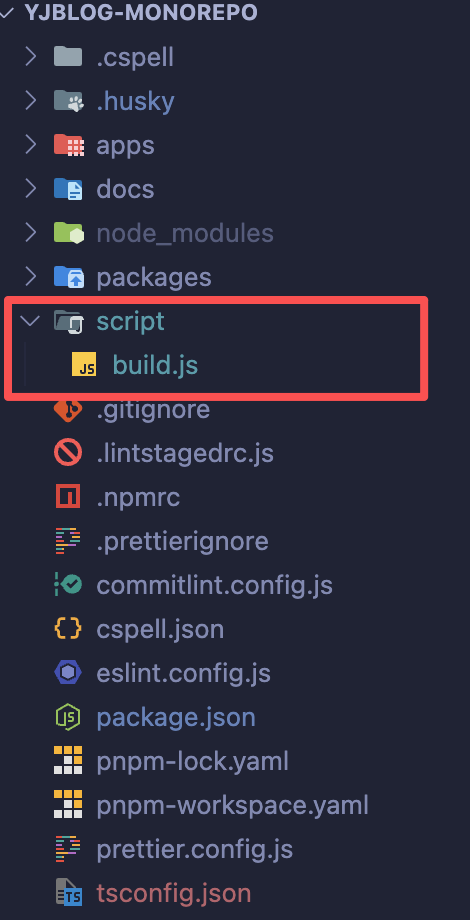
根目录下创建一个 script 文件夹内写一个 build.js 文件来管理打包脚本